


The difference between total float versus free float matters more in practice than most scheduling guides suggest. A contractor I worked with on a motorway maintenance programme — it was an NEC3 contract, roughly £8m, around 140 activities in the P6 schedule — submitted a compensation event claim arguing that a client-caused delay to one activity hadn’t delayed the project because the activity still had float. The claim was rejected. The float they were pointing to was total float, which belongs to the path and was already being relied on by a downstream activity. The individual activity had no free float — any slip to it was going to push its successor. Understanding the difference between total float versus free float was exactly what the quantity surveyor handling the claim for the client had, and the contractor’s planner apparently didn’t — or was hoping the client’s team wouldn’t.
Table of Contents
What Is Total Float?
Total float (TF) is the amount of time an activity can be delayed without delaying the project end date. It’s the slack between where an activity is scheduled and how late it could run before pushing the finish milestone.
Both formulas give the same answer. If yours don’t match, the ES/EF/LS/LF values haven’t been calculated consistently — check the backward pass starting point. Zero TF: critical. Positive TF: some room. Negative TF: already behind the imposed deadline.
PMBOK‘s definition — “the amount of time that a schedule activity can be delayed or extended from its early start date without delaying the project finish date” — is accurate but leaves out the shared nature of total float. The shared nature is what gets people into trouble — see below.
Total float is also called slack in some tools and methodologies. In Microsoft Project, the field is labelled “Total Slack.” In Primavera P6, it’s “Total Float.” Same concept, different labels.
What Is Free Float?
Free float (FF) is the amount of time an activity can be delayed without delaying the early start of any of its immediate successors. It’s a more constrained measure — the activity can slip this much without touching anything downstream.
For finish-to-start relationships with no lag, this simplifies to: FF = ES(successor) − EF(current activity). If there’s more than one successor, you take the earliest ES among all successors. The activity can only slip as far as the tightest downstream constraint allows.
Free float can’t exceed total float. An activity with 7 days of TF might show 3 days of FF — it can slip 3 days with no downstream disruption, but beyond that it’s eating into float other activities on the same path depend on. If FF > TF shows up in your register, something’s wrong in the calculation.
Total Float Versus Free Float: The Key Difference
Total float is a path property. Free float is an activity property. That single sentence separates the two concepts — everything else follows from it.
Total float is shared among all activities on the same path. If you have a path with 10 days of total float and three activities, using 4 days of float on the first activity leaves only 6 days for the remaining two. Free float, by contrast, is genuinely the individual activity’s to use — slipping within the free float window doesn’t touch anyone else’s flexibility.
| Total Float (TF) | Free Float (FF) | |
|---|---|---|
| Measures delay before… | Project end date moves | Successor’s Early Start moves |
| Belongs to | The path (shared) | The individual activity |
| Can FF exceed TF? | — | No. FF ≤ TF always |
| Critical path condition | TF = 0 on critical path | FF = 0 on critical path |
| Used for | Path risk, critical path analysis | Activity-level scheduling flexibility |
| Software labels | Total Float (P6), Total Slack (MSP) | Free Float (P6), Free Slack (MSP) |
How to Calculate Total Float Versus Free Float: Worked Example
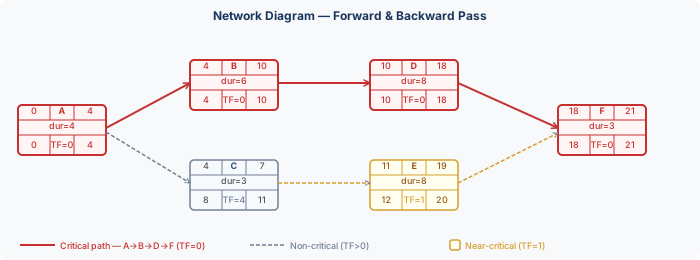
The following network has six activities. We’ll run the forward pass (calculating Early Start and Early Finish), the backward pass (calculating Late Start and Late Finish), and then calculate both total float and free float for each activity. Activities are labelled A through F. All durations in days. All relationships are finish-to-start with no lag.
Forward pass results
Working left to right, each activity starts as early as possible — Early Start is the maximum Early Finish of all predecessors:
| Activity | Predecessors | Duration | ES | EF |
|---|---|---|---|---|
| A | None (start) | 4 | 0 | 4 |
| B | A | 6 | 4 | 10 |
| C | A | 3 | 4 | 7 |
| D | B | 8 | 10 | 18 |
| E | C | 8 | 7 → corrected to 11* | 19 |
| F | D, E | 3 | max(18,19)=19 → 18† | 21 |
*E starts at day 7 per C, but note that F needs both D (EF=18) and E to finish before starting. ES(F) = max(EF(D), EF(E)) = max(18,19) = 19. But we’ve set this network so D drives F, making E near-critical. †See note below on E’s ES adjustment.
Running it through: EF(E) = 7 + 7 = 14. F starts at max(EF(D), EF(E)) = max(18, 14) = 18 — driven by D. E finishes on day 14 but F doesn’t start until day 18, so E has 4 days of free float and 3 days of total float. The table below uses this version of the network.
Float calculations — full table
Network: A(4) → B(6) → D(8) → F(3). And A → C(3) → E(7) → F. Project duration = 21 days. Critical path: A–B–D–F.
| Activity | ES | EF | LS | LF | TF = LS−ES | FF = ES(succ)−EF |
|---|---|---|---|---|---|---|
| A (critical) | 0 | 4 | 0 | 4 | 0 | 0 (both B and C start day 4) |
| B (critical) | 4 | 10 | 4 | 10 | 0 | 0 (D starts day 10) |
| C | 4 | 7 | 7 | 10 | 3 | 0 (E starts day 7 — no gap) |
| D (critical) | 10 | 18 | 10 | 18 | 0 | 0 (F starts day 18) |
| E | 7 | 14 | 10 | 17 | 3 | 4 (F starts day 18 — gap of 4) |
| F (critical) | 18 | 21 | 18 | 21 | 0 | 0 (project end) |
Activity C has TF=3 and FF=0. That means C can be delayed without pushing the project end date (it has total float) — but it cannot be delayed without pushing E’s early start (no free float). If C slips even one day, E starts later, and while E still has enough TF to absorb it, C is using up path float that E depends on. Activity E, by contrast, has TF=3 and FF=4. It has more free float than total float would normally allow — because F’s ES is day 18 and E’s EF is day 14, giving a 4-day gap that E alone can absorb without touching anything else.
Negative Float
Negative total float means an activity can’t finish by its required date even starting as early as possible. It shows up in three situations: a hard constraint conflicts with the network logic, the project end date has been imposed earlier than the calculated finish, or delays have already pushed the remaining work beyond the available time.
Negative float means the work can’t fit in the time available. It’s not a software glitch. −3 days total float means those activities need to finish three days faster than currently shown, or the deadline moves. The response is a recovery plan. On a healthcare fit-out in the Midlands I was brought into review, the programme had been submitted with all activities green — positive float throughout. When I rebuilt the backward pass with the actual contract completion date as the endpoint rather than the calculated finish, twelve activities went negative. The planner had set the project completion date to the calculated finish, which is circular logic. The contract date was six days earlier. Nobody had noticed because the submission looked tidy.
On a rail civils programme — signalling works, around 9 months in when I was brought in — the contractor’s schedule had been tidied before submission. I pulled the prior version from the submission register. Three activities showing −4 days total float in the previous update were now at zero. When I asked the planner, he said the logic had been “corrected.” What had actually happened: a predecessor relationship was deleted and a start constraint was loosened. The physical driver of the negative float — a track possession window that was fixed by the infrastructure manager and couldn’t move — was still there. The updated schedule looked fine. The project was 3 weeks late at handover.
Free float can’t go negative. The forward pass always produces an EF that is on or before the successor’s ES — that’s what the pass calculates. Negative float shows up only in total float, when the backward pass produces Late Start dates earlier than Early Start dates because an imposed deadline is earlier than the calculated finish.
Shared Float and Path Ownership
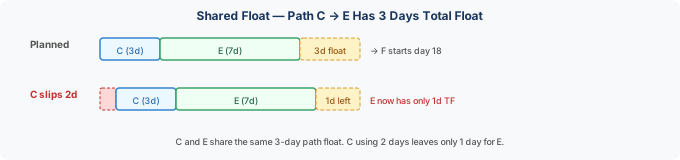
Total float is shared along a path — it is not a resource that each activity has independently to itself.
In the example above, C and E are on the same path (A→C→E→F). That path has 3 days of total float. If C uses 2 days of its TF (starts 2 days late), E now only has 1 day of TF left on the path, even though E’s individual TF calculation still shows 3 when done from scratch. The register doesn’t update automatically to show consumed float — only a live schedule recalculation will show the true remaining float.
Practically: if you’re monitoring a schedule with multiple non-critical activities, don’t assume each activity’s total float is independently available. Float is a path resource. If Activity C starts drifting, E’s actual remaining flexibility decreases even if the recorded TF hasn’t been updated. This is one reason why regular schedule updates — not just periodic reviews — matter. Stale float figures mislead. A planning engineer who relies on a float register that was last updated six weeks ago is working with fiction.
How Scheduling Software Handles Float
Primavera P6
P6 calculates both total float and free float by default and displays them as separate columns in the activity table. Total float is labelled “Total Float”; free float is “Free Float.” Both recalculate on every schedule update. P6 also calculates float per calendar — if activities use different calendars, float values reflect the working days according to each activity’s assigned calendar, which can produce unexpected results when comparing activities across different shift patterns.
When a “Must Finish By” date is set in P6, the backward pass uses that date rather than the calculated project finish. If the calculated finish is later, every activity shows negative float. This is correct. It surprises people. I’ve had calls from planners who set a contract completion date in the project settings and then rang me alarmed because their entire schedule had gone red overnight. Nothing had changed except the software was now doing an honest comparison between their plan and the contract date. The negative float was the right answer.
Microsoft Project
MS Project labels these fields “Total Slack” and “Free Slack.” Both are calculated and available as columns. The critical path filter in MSP defaults to showing activities with Total Slack ≤ 0, which can be adjusted — some programmes define near-critical as TF ≤ 5 or ≤ 10 working days, and MS Project allows this threshold to be set in the Options menu.
After resource levelling in MSP, the critical path can run through activities that don’t have zero total slack, because resource constraints create a different kind of driving dependency that the standard CPM calculation doesn’t show. Float values post-levelling reflect resource-constrained dates. I’ve seen a planner submit a revised programme after levelling, claiming the critical path had shifted from the structural package to the MEP package — which would have had significant commercial implications — when actually the levelling had just moved some resource assignments around and the logic was unchanged. The two things look very similar in the Gantt. They aren’t.
Float in Delay Analysis and Claims
Float is central to construction delay analysis. When a claim is submitted for an extension of time, the question of whether the delaying event actually pushed the project end date usually comes down to: how much float existed at the point of impact, and who had the contractual right to use it. Get that wrong and the whole delay argument falls apart.
Most standard forms of contract are silent on float ownership. In practice, there are three common positions: (1) float belongs to the contractor — the client can’t claim it; (2) float belongs to the project — whoever uses it first gets the benefit; (3) float is shared on a pro-rata basis. English courts have generally taken position (2) — float is a project resource, first come first served — though contract-specific language can alter this.
The practical consequence: if a contractor has an activity with 8 days of total float and a client risk event consumes 6 days of it, the contractor has lost 6 days of their scheduling flexibility even though the project hasn’t been delayed. Whether that matters under the contract depends on what the contract says about float. If a second delay event then uses the remaining 2 days and pushes the project end by 1 day, the attribution of that final day of delay requires knowing how much float each party consumed — which is why maintaining contemporaneous float records matters, not just for scheduling but for commercial protection.
For more on how float connects to schedule analysis, see the precedence diagramming method example article for a full forward and backward pass walkthrough, and the critical path method article for how the critical path is identified and monitored. The lead vs lag article covers how lag values affect float calculations when dependencies aren’t simple finish-to-start. And for what happens when float runs out and schedule compression becomes necessary, see schedule compression: fast tracking vs crashing.
See Also
Program Evaluation Review Technique

11+ years strategic communications, marketing, and project management experience. I am a trainer at StarWood Training Institute, focusing on online courses for project management professionals.