


I’ve reviewed programme schedules where a planner had entered positive lag when they intended lead — the dependency type was right, the value was wrong, and the project completion date was sitting 12 days further out than the plan required. Nobody had caught it because the schedule looked logical: one activity followed another, and the software hadn’t flagged an error. That’s the practical problem with lead vs lag in project management. Both modify the same part of a dependency relationship. Both appear in the same field in scheduling software. One extends the schedule; the other compresses it. Getting them backwards shifts your completion date in the wrong direction, and the software won’t tell you.
Table of Contents
What Is Lag Time in Project Management? Lead vs Lag Explained
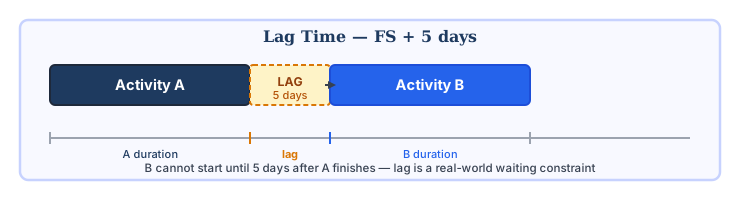
Lag time adds a waiting period between two activities. The successor has to wait — not because the predecessor is still running, but because something else requires time to happen first. In a finish-to-start relationship, Activity A finishes, then the lag period runs, then Activity B is allowed to start. The lag represents a constraint imposed by the real world, not by the logic of the schedule.
Concrete needs to cure. Paint needs to dry. A planning application has a statutory determination period. These waits don’t compress when you add resources — they’re time-dependent. The schedule has to carry them as they are. A planner who shortens a curing lag to hit a milestone date hasn’t compressed the schedule. They’ve produced a schedule that conflicts with physical reality.
Construction programmes carry a lot of lag — curing times, setting times, concrete strength development periods. These aren’t negotiable. Software projects have them too, though they’re less obvious: a code freeze before a release window, a mandatory soak period for a patch before it goes to production, the 48 hours between a penetration test completing and the report being available for review. Procurement programmes often have the largest individual lags — a 16-week steel fabrication lead time sitting on an FS relationship will dominate the critical path of anything that depends on it.
What Is Lead Time in Project Management?
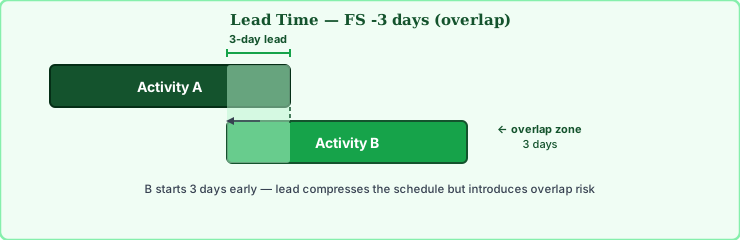
Lead time lets a successor activity start before its predecessor finishes — it creates deliberate overlap. Three days of lead on an FS dependency means B can start three days before A’s scheduled finish. Unlike lag, lead is a choice the scheduler is making — and it comes with an assumption that what A produces during the overlapping period will be stable enough for B to use.
That assumption isn’t always stated explicitly. It should be. If Activity A is “design foundation” and Activity B is “procure steel,” you might allow procurement to begin before the design is finalised, based on a near-final design. That’s lead. It compresses the schedule. It also introduces the risk that the design changes after procurement has started, creating rework.
Lead is closely related to the concept of fast-tracking — deliberately overlapping activities to compress schedule duration. The difference is that fast-tracking typically refers to a programme-wide strategy, while lead is applied at the level of individual dependency relationships. For a full discussion of the tradeoffs, see the article on schedule compression: fast-tracking vs crashing.
Another Example for Lead Time
Assume that you are a procurement manager of a steel bridge project and you are planning manufacturing and transportation activities. In your initial plan, relationship between the manufacturing and the transportation activity is Finish-to-Start. In order to accelerate the process, you can start the transportation activity before the completion of all the manufacturing.
Below figure illustrates two activities that have Finish to Start relationship. The transportation activity is dependent on manufacturing activity. In other words, manufacturing is the predecessor of transportation activity.

Another real-life example is as follows ;
Assume that you are building a hotel project and two activities wall cladding and painting have a Finish-to-Start relationship. When you are about to finish the cladding works on the first floor, you start the painting works without waiting all the cladding works are completed.
Lead vs Lag in Project Management: The Practical Difference
In scheduling software, lag is a positive value on a dependency link. Lead is a negative value — entered in the same lag field, just with a minus sign. FS+5 means a 5-day wait after A finishes. FS-3 means B starts 3 days before A finishes. The table below shows the practical differences.
| Lag | Lead | |
|---|---|---|
| Effect on schedule | Extends — pushes successor later | Compresses — pulls successor earlier |
| What it represents | A real-world waiting constraint | A scheduling decision to overlap |
| In software | Positive value on dependency link | Negative value (or lead field) |
| Risk profile | Low — reflects a genuine constraint | Higher — creates parallel work risk |
| Typical sources | Curing, drying, legal periods, lead times | Fast-tracking, partial design, procurement overlap |
| PMBOK terminology | Lag | Lead (negative lag) |
The practical confusion arises because both are modifications to dependency links, both appear in the same part of a scheduling tool’s interface, and both are expressed as time values. I’ve reviewed schedules where a planner had entered positive lag when they intended lead, pushing a completion date out by two weeks without realising it — the logical relationship was correct, but the sign was wrong.
Lead vs Lag in Project Management Across the Four Dependency Types
In lead vs lag in project management, both modifications can be applied to any of the four dependency types in the precedence diagramming method. The combination determines exactly how the successor activity is scheduled relative to its predecessor. For a detailed explanation of how these dependency types work, see the precedence diagram method article.
Finish-to-Start (FS) — the most common type
B cannot start until A finishes. This is the default dependency relationship. Lag on FS pushes B’s start further right; lead on FS pulls B’s start left, creating overlap. FS with lag is where most real-world waiting constraints live — curing times, document review periods, statutory consultation windows.
Start-to-Start (SS)
B can’t begin until A is underway. Lag on SS means B must wait a defined period after A starts before B can begin. In construction, a supervisor can’t start a formal inspection until the preceding earthworks trade has been underway long enough to have something worth inspecting — maybe 3 days into excavation. Lead on SS is less common and creates logical complexity; if you find it in a schedule, it’s worth understanding exactly what logic is intended before accepting it.
Finish-to-Finish (FF)
B’s completion is tied to A’s completion. Lag on FF means B must continue for a defined period after A completes. Lead on FF pulls B’s finish earlier relative to A’s finish — B can finish before A, by the lead amount. This is used where a trailing activity needs to complete some time before the driving activity ends.
Start-to-Finish (SF) — rare
SF reverses the usual logic: B can’t finish until A starts. SF is the least common dependency type and is rarely used correctly in practice. Adding lag or lead to SF relationships compounds the complexity. In practice, if you find SF relationships with lag or lead on a programme schedule someone else has built, it’s worth asking the planner to walk you through the logic before you accept it. I’ve twice found SF+lag combinations that were placeholders the original scheduler put in to “fix” a date constraint they didn’t know how to model properly.
Lead vs Lag in Project Management: Effect on the Critical Path
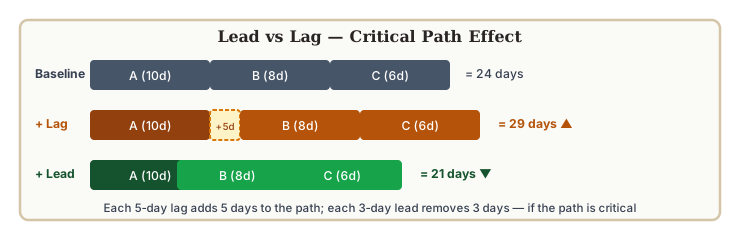
Both lead and lag affect float and, by extension, the critical path. Lag increases the duration of a dependency link, which can lengthen the critical path or create a new critical path through activities that previously had float. Lead compresses a dependency link, which can shorten the critical path or free up float on successor activities.
In lead time and lag time in project scheduling, the network arithmetic treats lag and lead values as extensions or compressions of the dependency link. A 10-day lag on a critical path activity does the same thing to the end date as a 10-day activity sitting on the critical path — it adds 10 days, if nothing else changes. This is why accumulated lag is worth auditing. It’s invisible in a Gantt chart view but it’s right there in the network, adding up.
One thing lead does that trips people up: it can produce what looks like negative float on downstream activities. It’s not an error in the schedule — it’s the arithmetic consequence of the overlap. The activity’s early dates are being pulled forward by the lead, but its late dates are still calculated from the project end. If you see this on a review and the schedule owner can’t explain it, that’s worth a conversation. The total float and free float article covers how float is calculated in these situations.
Negative Lag: Lead Expressed Differently
P6 doesn’t have a lead field. Neither does Microsoft Project, in any version I’ve used. You enter a lag value and if it’s negative the software treats it as lead — FS-3 gives you a 3-day lead on a finish-to-start. Asta handles it the same way. PMBOK formalises this by calling lead “negative lag,” which is technically correct but not how most planners think about it. The convention matters mainly when you’re auditing someone else’s schedule and trying to understand what a -5 on an SS relationship was supposed to mean.
The naming inconsistency creates real confusion in team environments. I’ve been in schedule reviews where half the room used “lead” and the other half said “negative lag” and everyone assumed they were talking about the same thing — until someone noticed that two planners had been entering the values with opposite signs. One team was entering -3 to mean “3-day lead”; another was entering +3 because they thought of lead as “moving forward.” Both plausible. Both incompatible. The only reliable fix is agreeing a convention in writing before the programme baseline is built.
Where Lead vs Lag Goes Wrong in Project Management
Lag as a cover for missing activities
The version I keep seeing: a baseline schedule has a 10-day lag on an FS relationship that nobody can clearly explain. When I ask what the wait represents, the answer is usually vague — “handover period,” “mobilisation time,” something like that. On two separate programmes, digging into those lags revealed activities that had been left out of the network entirely. The lag was filling a gap that actual work should have filled. Remove the lag, add the missing activities, and the schedule is longer — but it’s accurate.
Lead without documenting the rework exposure
Lead allows B to start before A finishes. If A’s output changes after B has started, B may need to be redone. This is the fundamental risk of overlap. In lead and lag in project management, lead trades schedule compression against rework exposure. I’ve seen programmes where lead had been applied across half the sequence to recover time lost earlier in the project, and the risk register still showed no rework risks. The schedule looked fine. The exposure was invisible unless you knew where to look.
Lag where an activity should be
A 5-day curing period where nothing happens is a lag. A 5-day testing process that involves an engineer, samples, and a lab report is an activity. That distinction matters when the schedule goes into execution — activities have progress, resource requirements, and cost tracking. Lags don’t. A lag that quietly contains work will produce a schedule that looks fine until the work needs to be reported, resourced, or accelerated. At that point the planner has to either add an activity retroactively or pretend the work doesn’t exist.
Accumulated lag that nobody questions
Forty days of lag hiding in 8 review interfaces, 5 days each, is a pattern I’ve seen more than once. Each individual lag looks reasonable. Nobody questions 5 days for a design review. But 8 of them in sequence is a month and a half of waiting built into the baseline. Whether those waits reflect genuine processing times or inherited padding from a previous project is usually worth 30 minutes of checking — and in a compression exercise, reviewing lag values systematically tends to find more time than fast-tracking does.
Lead and Lag in Project Management: Examples Across Project Types
Construction — concrete pour and curing
A concrete slab is poured on day 1. The structural specification requires 28 days of curing before loading. The dependency between “pour slab” and “erect steelwork” is FS+28. That’s lag. It’s non-negotiable — the concrete needs the time regardless of programme pressure. In practice, this type of lag shows up hundreds of times in a large construction programme. One of the more consistent errors I’ve seen is a planner reducing a curing lag to 14 days to hit a handover milestone — the original specification called for 28. The resulting schedule looked achievable. The structural engineer on the project had no idea the lag had been changed until a QA audit picked it up three weeks before pour.
Software — environment provisioning and testing
Test environment provisioning is a common one — the environment needs 2 or 3 days to be set up before testing can run. Some teams add that as a lag on the FS between “code complete” and “testing.” Whether that’s right depends on whether anyone’s actually doing the provisioning. If it’s automated and genuinely requires no resource tracking, a lag is fine. If it involves a DevOps engineer who’s already allocated to three other things, it’s an activity that needs to appear in the resource plan. I’ve seen it go both ways, and the version where it was hidden in a lag caused a resourcing conflict three weeks in.
Procurement — design and procurement overlap
In engineering projects, procurement of long-lead items often starts before design is fully signed off. The planner enters a negative lag on the FS between “design complete” and “issue enquiry” — maybe 3 weeks, based on how far along design typically is at that point in the programme. That’s a judgment call, not a verified constraint. I’ve seen that 3-week lead figure get copied from a previous project’s template without anyone checking whether the design maturity assumption still held. When the design ran later than expected, procurement had gone out against incomplete information and two of the specs changed. The rework cost was real. The lead was not flagged as a risk.
Document review — statutory consultation periods
Planning applications, environmental impact assessments, and similar statutory documents typically have fixed consultation periods of 21, 28, or 42 days. These are pure lag values — the regulator’s decision period, during which nothing the project team does can accelerate the response. In a programme with multiple regulatory submissions, these lags can dominate the critical path.
For a deeper look at how these dependency modifications interact with network calculations, see the precedence diagramming method example and the critical path method article.
A Worked Lead vs Lag Network Diagram Example
The following network shows a simplified fit-out sequence with a mix of lag and lead relationships. Activity relationships are realistic for a commercial interior fit-out programme. Spotting which relationships use lag (wait) and which use lead (overlap) is a useful exercise before applying the same reading to a live programme schedule.
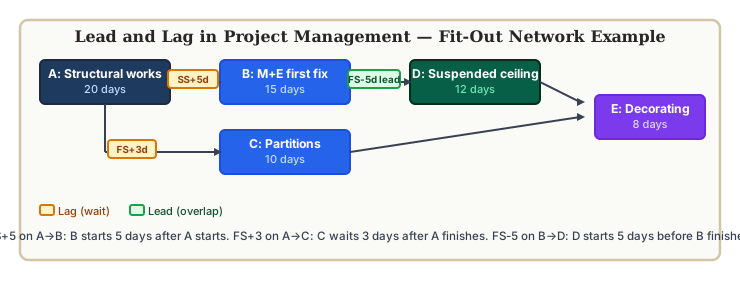
The SS+5 relationship between structural works and M+E first fix reflects a practical constraint: the M+E trades can mobilise once structural works are 5 days underway, but not before. The FS-5 lead between M+E first fix and suspended ceiling reflects a scheduling decision — ceiling installation can begin while M+E is still completing its last 5 days, accepting the risk that any M+E rework in that final period might require ceiling re-opening.
External Reference

Irma Gilda is chief executive of Sonic Training and Consultancy Co., the training platform offers project planning and scheduling More than 60 k learners have used the platform to attain professional success. Irma is a professional Primavera P6 Trainer.



I like this site very much, it is too helpful and easy understandable. Thanks.