


These gantt chart examples for project management exist because of a meeting I still think about. Warehouse fit-out in Coventry, 2011 — not a construction gantt chart example of any great complexity, but the client’s project manager had asked for a programme. I built a detailed Gantt in P6, printed it on A0, and brought it to the progress meeting. He looked at it for a long time. Then he said: “This is beautiful. I have no idea what it means.” I’ve thought about that exchange more than once in the years since. A Gantt chart is only as useful as the person reading it can understand it. The format, the level of detail, the colour coding — all of it has to match the audience and the decision being made.
Table of Contents
This article covers Gantt chart examples across four project types — construction, software development, event management and IT infrastructure — with a worked example for each one, an explanation of what each element means, and an honest look at where Gantt charts work and where they don’t.
What a Gantt Chart Shows — and What It Doesn’t
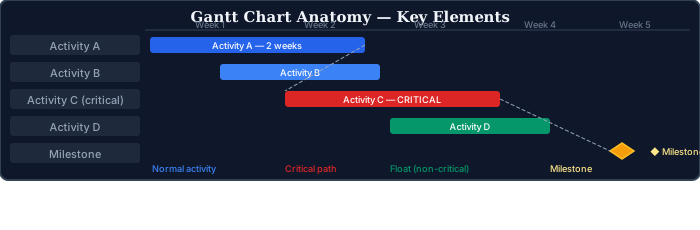
The format is simple enough: activities on the left, time running left to right, bars showing duration and position. Dependency lines connect activities that are sequenced — an arrow from the end of one bar to the start of another means the second can’t start until the first finishes. The critical path is the chain of activities where any delay pushes the end date; everything else has some float.
What a Gantt chart doesn’t show is the part that bites people. No cost. No resource loading — no visibility of whether the people doing overlapping activities are actually available. No scope — the bar labelled “procurement finalised” tells you nothing about what finalised means, which specifications are locked, which aren’t, and what happens if a spec changes after the procurement window closes. The chart shows timing. Everything else has to live somewhere else and connect back to it, which requires discipline that most projects don’t maintain consistently.
“The Gantt said we’d finish by March.” I’ve heard that complaint on at least a dozen projects. What the Gantt actually said was: if these activities take this long and run in this sequence, the maths gives you March. Whether those activity durations are realistic, whether the resources are available, whether the dependencies are complete — none of that is in the chart. The chart accepts your inputs and does arithmetic. The inputs are the PM’s job.
How to Read a Gantt Chart for Project Management — Key Elements in Every Example
The four elements that matter on any Gantt: the bars, the dependency lines, the critical path, and the baseline. Get one of those wrong and the chart is misleading.
Activity bars — the length is planned duration, the position is when it happens. A long bar doesn’t mean the activity is late; it means it was always going to take that long. Progress typically shows as a percentage fill inside the bar, or as a separate line running across the chart. Neither of those indicators is worth much if the underlying estimates were wrong to begin with.
Dependency lines connect activities that are sequenced. An arrow from the end of Activity A to the start of B means B waits for A. The most common Gantt error isn’t a wrong duration — it’s a missing dependency. Two activities running in parallel on the chart that physically can’t overlap in reality. The schedule shows an end date that was never achievable. Nobody notices until one of the activities finishes and the other hasn’t started yet because the resources weren’t available.
The critical path is the sequence of activities that determines the project end date. Any delay on a critical activity delays the end date by the same amount. Activities not on the critical path have float — they can be delayed by some amount without affecting the end date. The critical path is usually highlighted in red or a contrasting colour. On a complex project, there may be multiple near-critical paths that are almost as risky as the critical path itself.
The baseline is the original plan, frozen at approval and kept for comparison. Without one, you can see the current schedule but not whether it’s moved from where it started. Baseline shown as a thin line below the current bar: if the current bar is to the right, the activity has slipped. I’ve audited programmes where the baseline had been “refreshed” four times — effectively tracking against whatever the latest plan was, which makes performance reporting meaningless. A baseline is only useful if it’s not moved every time the plan changes.
Construction Gantt Chart Example
A construction gantt chart example typically has more activities, longer durations, and tighter dependency logic than most other project types. Construction is sequenced by physical reality — you can’t pour a slab before the ground is prepared, you can’t install services before the structure is closed in — which means the dependency network is largely non-negotiable. The schedule reflects physical constraints, not just organisational preferences.
The construction example is a 16-week commercial office fit-out — complex enough to need a proper Gantt, small enough to show the structure clearly at summary level.
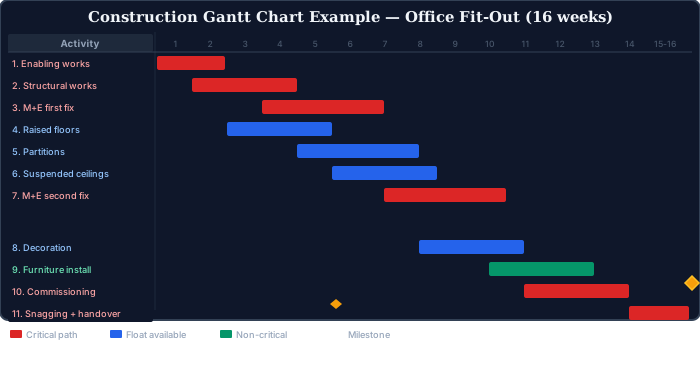
In this construction gantt chart example, enabling works → structural alterations → M+E first fix → M+E second fix → commissioning → snagging and handover drive the end date. That sequence determines the 16-week end date. Partitions, ceilings, and decoration all have float — they can slip without affecting handover, as long as M+E second fix completes on schedule. In practice, second fix is often what drives the snagging list, so protecting that activity is the key scheduling priority.
You can also use Excel do build your own construction gantt chart as shown in the above example.

Here all the activities are listed under certain WBS levels on the left. The timescale above shows the total project duration divided by weeks. Activity bars can be shown on the right side. Duration of each activity is represented by cells.
What makes a construction Gantt chart work
The dependency logic is the critical element in any gantt chart examples for project management context, and construction is where poor dependency modelling causes the most damage. A construction Gantt chart with accurate activity durations but incorrect dependency relationships will produce a schedule that looks plausible but fails in execution. The most common dependency errors: failing to model the constraint between M+E first fix and partitions (partitions can’t close in an area until the first fix is complete), and failing to include the statutory inspection hold points that require sign-off before work proceeds.
A construction gantt chart example should also show a baseline. Construction projects change — design variations, ground conditions, procurement delays — and the ability to compare current programme to original programme is essential for both contractual claims and internal performance management. A Gantt chart that only shows the current plan, with the baseline overwritten each time the programme slips, is worse than useless for contract management.
Software Project Gantt Chart Example
Software development Gantt charts are more controversial than construction ones, and for good reason. In agile environments, detailed activity-level Gantt charts conflict with the iterative, responsive nature of sprint-based delivery. But Gantt charts still have a role at the programme level — showing release milestones, sprint boundaries, major integration points, and the relationships between workstreams.
For software, the Gantt works best at the release level — major workstreams, sprint boundaries, integration and testing milestones — rather than at user story level, where a backlog is the right tool. The 18-week example below shows a coordinated multi-team delivery, not a single sprint cycle.
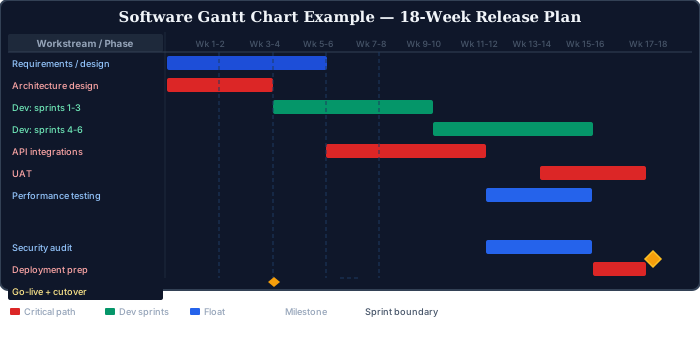
Architecture design, API integrations, UAT and deployment form the critical sequence. Dev sprints feed into UAT but don’t directly drive the end date — a sprint that slips by a day might be absorbed; API integrations that slip by a week won’t be.
One thing this Gantt doesn’t show: velocity. Whether the development sprints will actually deliver what’s needed for UAT to run depends on sprint completion rates, which the Gantt takes as given. A Gantt chart for a software project is a plan, not a forecast. The forecast lives in the sprint velocity data. The Gantt shows the sequence and timing of major workstreams; the backlog and velocity metrics show whether those workstreams are on track.
Event Management Gantt Chart Example
Event management Gantt charts span longer planning horizons than most people expect. A 500-person professional conference typically has a planning cycle of six to nine months, with the actual event itself at the far end. The Gantt covers everything from venue selection and speaker confirmation through to post-event reporting.
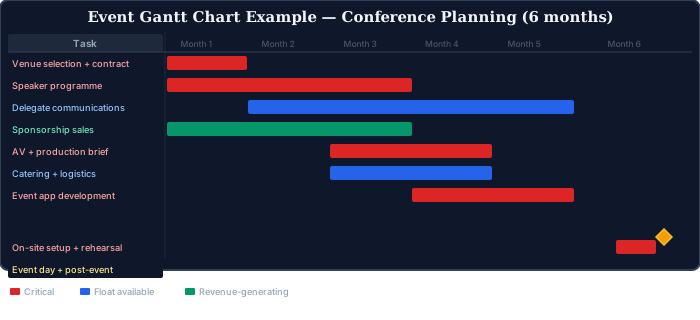
The event Gantt has a hard constraint that most project Gantt charts don’t: the event date. It can’t move. Every activity either feeds into the event date or depends on it. Speaker programme, venue contract and AV brief are all on the critical path — if the speaker programme isn’t finalised, the event app can’t be built, and if the app isn’t ready, delegates don’t have their session guides. The dependency chain is tight and runs the full six months.
IT Infrastructure Gantt Chart Example
IT infrastructure projects — server migrations, network upgrades, system deployments — have a Gantt structure that’s heavily influenced by maintenance windows and change control cycles. Most IT work in production environments can only happen during approved downtime windows, which creates hard constraints that compress the available schedule significantly.
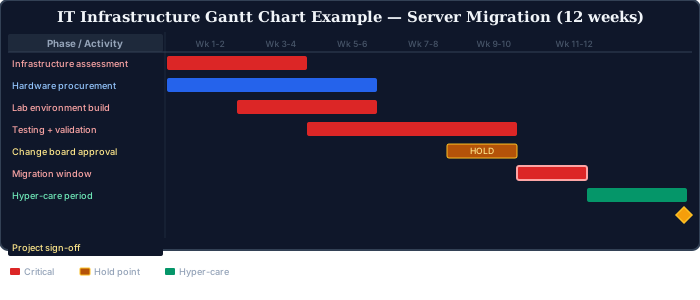
The change board approval hold point is the element that most IT project Gantt charts either get wrong or omit entirely. Change advisory boards typically meet weekly or fortnightly, and if testing overruns by even a few days, the migration window might miss the next approval slot, pushing the project back by two weeks. That constraint doesn’t appear in the Gantt unless someone has modelled it explicitly — and it rarely gets modelled until it’s already caused a delay.
When Gantt Chart Examples for Project Management Break Down
Gantt charts fail in predictable ways. Knowing when not to use one is as important as knowing how to build one.
When the project is genuinely agile
If work is being delivered iteratively in sprints, with scope defined progressively rather than upfront, a detailed activity-level Gantt is the wrong tool. It creates false precision — committing to activity durations and sequences before the requirements are stable enough to support that level of planning. A high-level roadmap showing sprint boundaries and milestones is appropriate. A 400-activity Gantt is not.
When dependencies are too complex for a 2D chart
Major infrastructure programmes with thousands of activities and hundreds of dependency relationships become unreadable as Gantt charts. The A1 printout that nobody can interpret. A network diagram or a logic-based scheduling tool with filtered views by workstream or area is more useful. Summary-level Gantt for stakeholders. Detailed network for planning. Different tools, different audiences.
When the schedule isn’t maintained
A Gantt chart that was accurate at baseline and hasn’t been updated in six weeks is worse than no Gantt chart. It creates false confidence — stakeholders believe the project is on track because they last saw a green programme. An unmaintained Gantt is a liability. In contract disputes. In client reporting. In post-project reviews. If the project doesn’t have the resource to maintain the schedule properly, a simpler tool — a milestone tracker, a two-week lookahead — is more honest and more useful.
Gantt Chart Tools for Project Management
The best gantt chart examples for project management use whichever tool the team will actually open on Monday morning. A sophisticated scheduling tool that nobody maintains after week two is worse than a shared Excel file that gets updated every Friday.
Microsoft Project is the industry standard for complex construction and infrastructure programmes. It handles large activity counts, resource loading, and baseline comparison. The learning curve is steep and licences are expensive. For large multi-million pound programmes where schedule accuracy is a contractual requirement, it’s worth the investment.
Oracle Primavera P6 is the tool of choice for major capital programmes — oil and gas, civil engineering, large-scale construction. It handles programmes with tens of thousands of activities and supports enterprise-level resource and cost management. Most organisations use a fraction of its capability. The enterprise resource and cost management features take years to implement properly, and many projects run P6 purely as a scheduling tool while the rest of its capability sits unused.
Microsoft Excel remains surprisingly effective for simple projects up to about 50 activities. A manually drawn Gantt in Excel — with conditional formatting for colour coding — is easier to read than a complex scheduling tool output for many audiences, and faster to update when the plan changes. The limitation: no automatic dependency calculation. If activity A extends by a week, you have to manually move everything downstream.
For more on how Gantt charts connect to the broader project scheduling toolkit, see the articles on the critical path method, precedence diagram method, and total float and free float — the concepts that underpin every Gantt chart’s dependency calculations and critical path analysis.
External References

Victor Z Young is a Civil Engineer with 35 years of experience working alongside the executive team of various construction companies. Victor specializes in construction insurance, delay analysis, performance analysis and engineering. He holds a Doctor of Project Management from Northwestern University.



Business training can increase your profession.
Logistics and international shipping is already complicated but when building materials are concerned, It’s pure chaos. That’s where we step in. We deliver fast, accurate information with razor-sharp transparency. Your shipments, your dollars, your data, all handled with precision and care. Bad news happens, but surprises don’t—not with us! We’re not perfect, but we always exceed our clients’ expectations. We handle a range of logistic services across many industries, but building materials are our specialty!